
Appointments become reservations
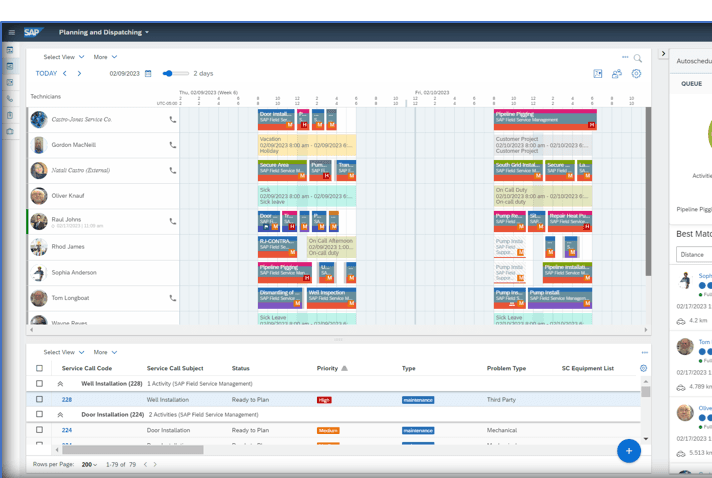
Technicians’ Outlook appointments are automatically created as reservations in SAP FSM — instantly visible on the planning board.
Technicians’ Outlook appointments land on the planning board as reservations.
OPUS InviteIn syncs your technicians’ Outlook appointments into SAP FSM: trainings, meetings and absences appear as reservations in dispatching — before anything gets double-booked.
Integration
OPUS InviteIn continuously transfers Outlook appointments into SAP FSM as reservations — dispatching plans with real availability.
Synced: Meeting · Training · Absence
≈ 1 hour
from installation by your admin to a running sync
Appointment → reservation
every Outlook appointment shows up as a reservation in SAP FSM
Start small
begin with a few test users, roll out to the whole team anytime
And the other direction? OPUS InviteOut brings FSM dispatch planning into the Outlook calendar. View the extension
The challenge
Trainings, internal meetings and absences are invisible to dispatching.
Double bookings only surface when the technician cancels.
Dispatchers copy appointments over by hand — double work, double source of errors.
Functionality
Technicians’ Outlook appointments are automatically created as reservations in SAP FSM — instantly visible on the planning board.
Dispatchers see when technicians are tied up by trainings, meetings or private appointments — not just the FSM jobs.
No more copying appointments over — synchronisation runs in the background, and conflicts surface before planning.
A look inside
A look into the extension — screenshots are added continuously.
The result: the planning board also shows what was scheduled outside SAP FSM.
Installation
Step by step to a running extension — view it right in the browser or download the PDF.
The installation guide for OPUS InviteIn is being finalised and will be available here shortly.
Until then, we accompany every installation personally.
More extensions
A short demo says more than any feature list — directly with the people who build the extension.