
Tool master data
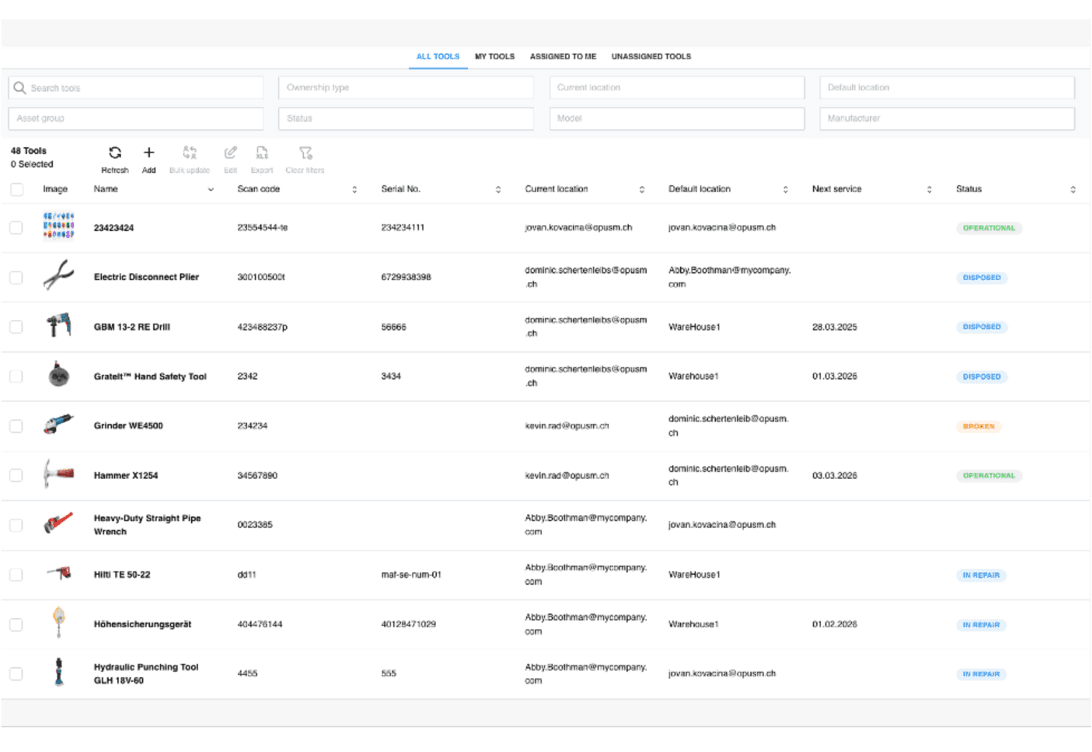
Every tool fully recorded — with manufacturer, model, serial number, scan code, image and status across the whole lifecycle.
Tools and test equipment under control — from master record to audit readiness.
OPUS Tools manages tools and test equipment directly in SAP FSM: master data, locations and assignments, service schedules and certificates — seamlessly integrated into your existing field service and asset management processes.
The challenge
Tools move between warehouse, vehicle and site — without documented handovers, nobody knows who has what.
Service and inspection records live in Excel lists outside the system — when the audit comes, the search begins.
Whether employees hold the required certificates only becomes clear on the job — compliance turns into a risk.
Functionality
Every tool fully recorded — with manufacturer, model, serial number, scan code, image and status across the whole lifecycle.
Always visible what sits in the warehouse and what is out with which technician — with a traceable history of every handover.
Define service schedules, monitor due dates and document results — every record where it belongs: on the tool.
Scan the code, take over the tool: the handover is done on mobile in seconds — and documented automatically.
Change status or location for many tools in one step — instead of record by record.
Even complex employee certificates are maintained and tracked — qualifications and equipment in one system, ready for the audit.
A look inside
A look into the extension — screenshots are added continuously.
The tool list: location, assignment, next service and status — filterable by everything that matters.
Installation
Step by step to a running extension — view it right in the browser or download the PDF.
The installation guide for OPUS Tools is being finalised and will be available here shortly.
Until then, we accompany every installation personally.
More extensions
A short demo says more than any feature list — directly with the people who build the extension.