
Assignments in the Outlook calendar
Service assignments, reservations and absences from SAP FSM appear automatically in the technician’s calendar — with no manual step.
Your technicians’ dispatch schedule lands automatically in the Outlook calendar.
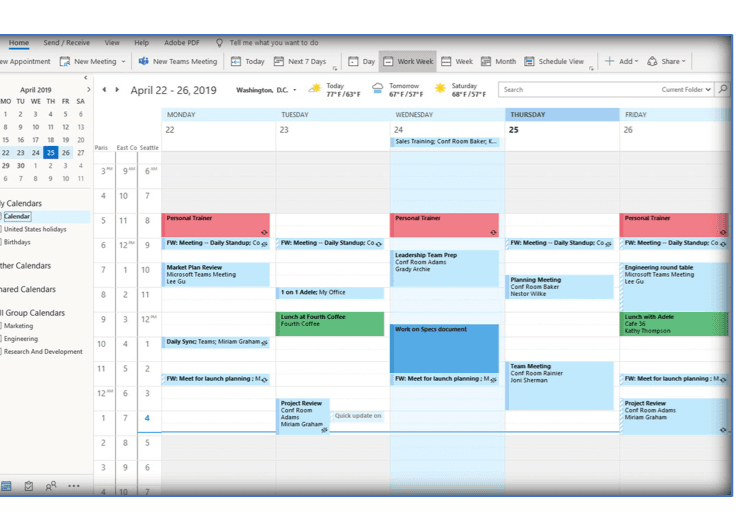
OPUS InviteOut continuously syncs service assignments, reservations and absences from SAP FSM into your technicians’ Outlook calendars. The whole company sees the service team’s availability — without any FSM access.
Integration
OPUS InviteOut continuously transfers dispatch planning from SAP FSM to Outlook — one direction, no conflicts: the planning board stays in charge.
Synced: Assignment · Reservation · Absence
≈ 1 hour
from installation by your admin to a running sync
FSM stays master
one-way synchronisation — no conflicts with dispatching
0 FSM licences
needed by anyone who just wants to see availability
And the other direction? OPUS InviteIn brings Outlook appointments into the planning board as reservations. View the extension
The challenge
Colleagues without FSM access can’t see when technicians are on jobs — meetings get scheduled blind.
Every availability question goes through dispatch — it turns into an information desk.
Hand-maintained calendar copies are outdated after the first replanning.
Functionality
Service assignments, reservations and absences from SAP FSM appear automatically in the technician’s calendar — with no manual step.
If a job is moved or cancelled, the calendar entry follows automatically. SAP FSM always remains the leading system.
Anyone scheduling time with technicians sees free slots right in Outlook — no FSM licence required.
A look inside
A look into the extension — screenshots are added continuously.
The result: the technician’s Outlook calendar, filled from SAP FSM dispatch planning.
Installation
Step by step to a running extension — view it right in the browser or download the PDF.
The installation guide for OPUS InviteOut is being finalised and will be available here shortly.
Until then, we accompany every installation personally.
More extensions
A short demo says more than any feature list — directly with the people who build the extension.